Guide
How to make a PDF under 100 KB
Upload forms often cap files at 100 KB. This guide explains what that limit means in bytes, shows measured results for how much detail survives at 50, 100 and 200 KB, and gives the steps to make a PDF that fits and is still readable.
By PNG to PDF Tools · Published · Last reviewed
What “100 KB” means
In the SI system a kilobyte is 1,000 bytes. The binary unit of 1,024 bytes is properly called a kibibyte (KiB), as NIST explains, but many programs still label it “KB”. So a form’s “100 KB” limit could be checked as 100,000 or as 102,400 bytes.
A file of 100,500 bytes passes one check and fails the other. The size targets on this site use 1 KB = 1,000 bytes, so a file made for “under 100 KB” is at most 100,000 bytes and passes either way.
How much detail fits: measured results
We ran two test images through this site’s converter on A4 pages: a 12-megapixel photograph and a 300 DPI scan of a full A4 text page. The table shows the resolution each page kept. “Per inch” is measured across the 8.27-inch width of A4.
| Target | 1 photo | 1 scanned page | 2 scanned pages (each) | 5 scanned pages (each) |
|---|---|---|---|---|
| 50 KB | 846 × 634 | 416 × 589 (~50 per inch) | 266 × 377 (~32 per inch) | 170 × 241 (~21 per inch) |
| 100 KB | 1321 × 991 | 650 × 920 (~79 per inch) | 416 × 589 (~50 per inch) | 266 × 377 (~32 per inch) |
| 200 KB | 1652 × 1239 | 1016 × 1437 (~123 per inch) | 650 × 920 (~79 per inch) | 416 × 589 (~50 per inch) |
Reading the scans back: at about 50 pixels per inch, headings were readable but body text broke up; at about 79 it was readable but soft; at about 123 it was clean. Your own results depend on the image, but the pattern holds: the limit is shared between pages, so each extra page costs every page detail.
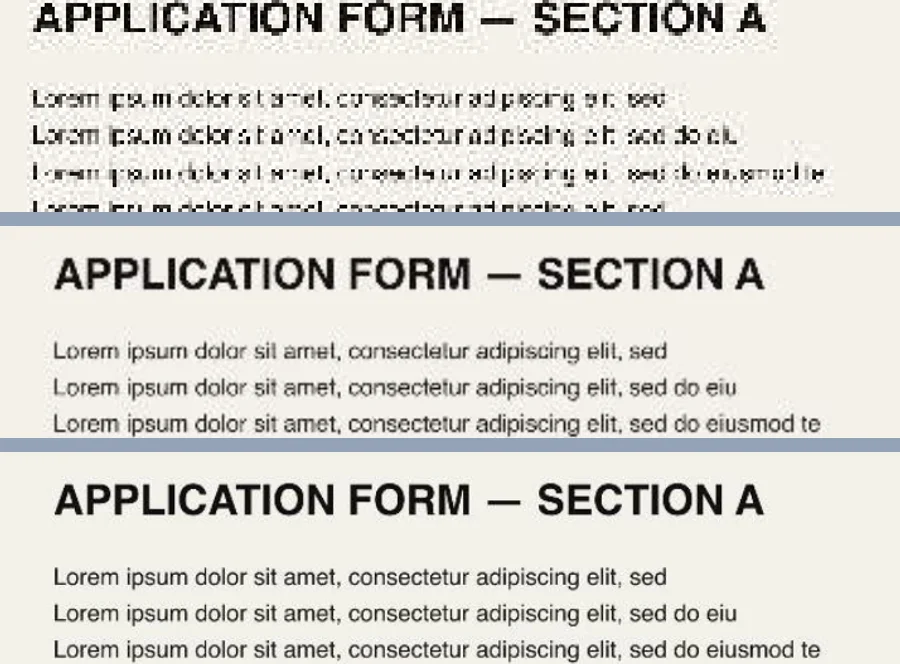
How the file is made smaller
A phone photo is large because it holds millions of pixels saved at high JPEG quality. A PDF can only get smaller if those pixels are stored more compactly, which means giving up some detail. This site’s converter does it in a fixed order, so the result is predictable:
- The size limit is split equally between the pages, after a small allowance for the PDF’s own structure.
- An image already smaller than its share is embedded unchanged.
- A larger image is re-encoded as JPEG, lowering quality from 92% towards 50% until it fits.
- If 50% quality is still too large, the image is scaled down by 20% and the search repeats, until it fits or becomes too small to be useful.
- Transparent areas are filled with white, because JPEG has no transparency.
Lowering quality before resolution keeps text edges in place for as long as possible; once resolution has to drop, small text is what suffers first, which is what the measurements above show.
Steps
- 1
Crop the images first
Crop each photo or scan to the document itself. Background around the paper uses bytes that could have gone to the text.
- 2
Open the converter
Open JPG to PDF Under 100 KB. The File size option is already set to Under 100 KB.
- 3
Add as few pages as possible
Add the images in page order. If the form accepts several files, one page per file keeps each page sharper.
- 4
Convert and read it back
Press Convert, check the size shown in the status line, then open the PDF and zoom in to confirm the text is readable.
If it will not fit or is unreadable
- Use the largest size the form allows. In the table above, one A4 scan went from readable but soft at 100 KB to clean at 200 KB.
- Split a multi-page document into several files, if the form accepts them.
- Remove pages the form did not ask for, such as blank backs.
- If the converter reports that the PDF is still over the target, it could not fit the pages without making them unusable. Reduce the number of pages rather than forcing it.
Sources
- Prefixes for binary multiples — NIST
- How it works: the conversion pipeline used for the measurements — convertpngpdf.site
Official requirements change. This guide was checked against the sources above on 12 October 2026; where a form you are filling in states something different, follow the form. Figures about this site’s own output were measured with the converter itself, as described on how it works.