Documents & ID
PAN Card Photo & Signature to PDF
Produce PAN application photo and signature pages at the published sizes.
- No sign-up
- Files never uploaded
- No watermark
- Up to 100 files
Add your imagesDrop your images here
Up to 100 pages, 200 MB per file. Nothing is uploaded.
The page is created at the millimetre size shown. Your originals are never modified.
Overview
PAN is the Permanent Account Number, a ten-character alphanumeric identifier allotted by the Indian Income Tax Department through Protean (formerly NSDL e-Governance) and UTIITSL. Applications ask for a photograph and a signature at specific physical dimensions, and the tool above creates a PDF page at exactly those dimensions — 25 × 35 mm for the photograph and 45 × 20 mm for the signature — so the output matches the specification rather than being rescaled inside a standard A4 page.
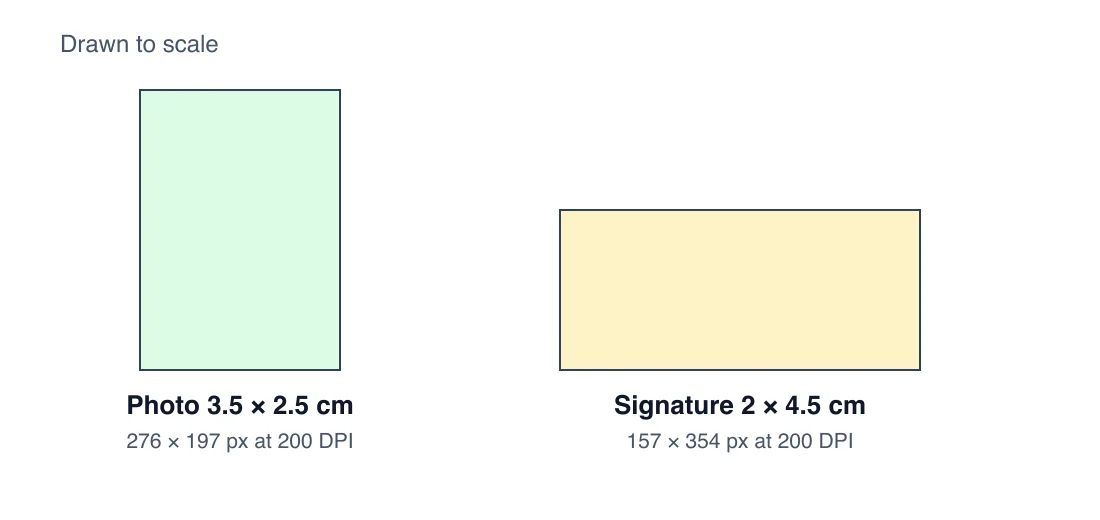
The sizes, and where the numbers come from
The commonly published photograph specification is 3.5 cm tall by 2.5 cm wide in portrait, which is 35 × 25 mm. The signature specification is 4.5 cm wide by 2 cm tall in landscape, which is 45 × 20 mm. This tool states both in millimetres and derives everything else from them, since millimetres are what the specifications are actually written in.
Pixel dimensions depend entirely on the resolution you supply, so they are arithmetic rather than fixed values. At 200 DPI, 25 mm is 197 px and 35 mm is 276 px, giving a 197 × 276 px photograph. At 200 DPI the signature is 354 × 157 px. At 300 DPI the same measures are 296 × 413 px and 531 × 236 px. The page is created at the millimetre size regardless, so the physical dimensions are correct whatever resolution you upload.
How to build the two pages
Select the photograph size, add the photo image, and convert. Then select the signature size, add the signature image, and convert again. The two conversions are deliberately separate, because the picture and the signature are different physical dimensions and putting them in one file would misstate both.
Photograph the signature on plain white paper with a dark pen, in even light, and take the photograph square-on. Crop tightly around the signature so little white surrounds it — with the margin set to none, the image fills the page exactly.
How to convert PAN card to PDF
Choose the photograph size
Select PAN photo — 25 × 35 mm in the Document size control. The page will be created at exactly those dimensions.
Add the photograph
Drop the image onto the drop area or press Add files. It is placed to fill the page, keeping its aspect ratio.
Convert the photo, then the signature
Press Convert and download. Repeat with the PAN signature — 45 × 20 mm size for the signature image so each is produced at its own dimensions.
Check the output
Open the PDF and confirm each page measures the expected size before uploading it to the application form.
Read the requirement from your own portal
PAN application requirements are set by the service provider you apply through, and they change. Some portals ask for a JPEG at a stated file size in kilobytes rather than a PDF, and file-size caps of roughly 20 KB to 50 KB for the photograph are commonly published. This tool produces a PDF page at the stated millimetre size. If the portal sets a size cap, choose a File size target before converting: the image is then re-encoded as JPEG, lowering quality and then resolution until the PDF fits. Check the current requirement on the form before you convert, and keep the original for anything that must stay lossless.
Frequently asked questions
What size should a PAN card photograph be?
The commonly published specification is 3.5 cm tall by 2.5 cm wide, portrait, which is 35 × 25 mm. At 200 DPI that is 197 × 276 pixels. This tool creates the PDF page at 25 × 35 mm exactly.
What size should the signature be?
The commonly published specification is 4.5 cm wide by 2 cm tall, landscape, which is 45 × 20 mm. At 200 DPI that is 354 × 157 pixels.
Are the outputs uploaded anywhere?
No. Decoding and PDF assembly both run in your browser. Nothing is transmitted, which matters for identity photographs.
Does this compress my image to a target file size?
Only if you ask it to. By default the image is embedded at the resolution you supply. Choose a File size target (50 KB up to 2 MB) and the tool re-encodes the image as JPEG, lowering quality and then resolution until the PDF fits. Compression always costs some detail, so pick the largest target the portal allows. If a portal wants a JPEG rather than a PDF, this tool will not produce one.
Can I put the photo and signature in one PDF?
They are different physical sizes, so combining them in one file would misstate both. Convert them separately and upload each to its own field on the form.
Why does my page look smaller than expected?
The margin control adds space around the image inside the page. Set it to No margin for document uploads where the image should fill the page.
Is this affiliated with NSDL, Protean or UTIITSL?
No. This is an independent layout tool. It is not affiliated with any income tax authority, and it does not submit anything on your behalf.
Guide
- PAN card photo and signature size
Online PAN applications through Protean (formerly NSDL e-Gov) ask for a photograph and signature at stated sizes, resolutions and file sizes. This guide sets out the published figures, shows where Protean’s own pages differ, and converts them into pixels.
Related converters
- Aadhaar to PDFPlace the front and back of an Aadhaar card on one PDF page, as portals expect.
- Passport Photo to PDFLay passport photographs out at 35 × 45 mm or 2 × 2 in on a PDF page.
- JPG to PDF under 50 KBFit a photo or a single document page into a PDF under 50 KB for strict upload limits.
- Image to PDFEvery supported image format into one PDF, in the order you choose.