Documents & ID
JPG to PDF Under 200 KB
Combine photos or scanned pages into one PDF under 200 KB, sized in a single step.
- No sign-up
- Files never uploaded
- No watermark
- Up to 100 files
Add JPG filesDrop JPG files here
Up to 100 pages, 200 MB per file. Nothing is uploaded.
Page size and margin apply to output pages. A file-size target re-encodes images as JPEG to fit; leave it on Original to keep every pixel. Your originals are never modified.
Overview
A 200 KB limit is roomy enough for a document that is more than one page, which is where most "under 200 KB" requests come from: a certificate with a reverse side, a two-page form, a set of receipts. This page has the File size target preset to Under 200 KB, so the images are combined into one PDF and fitted to the limit in the same step.
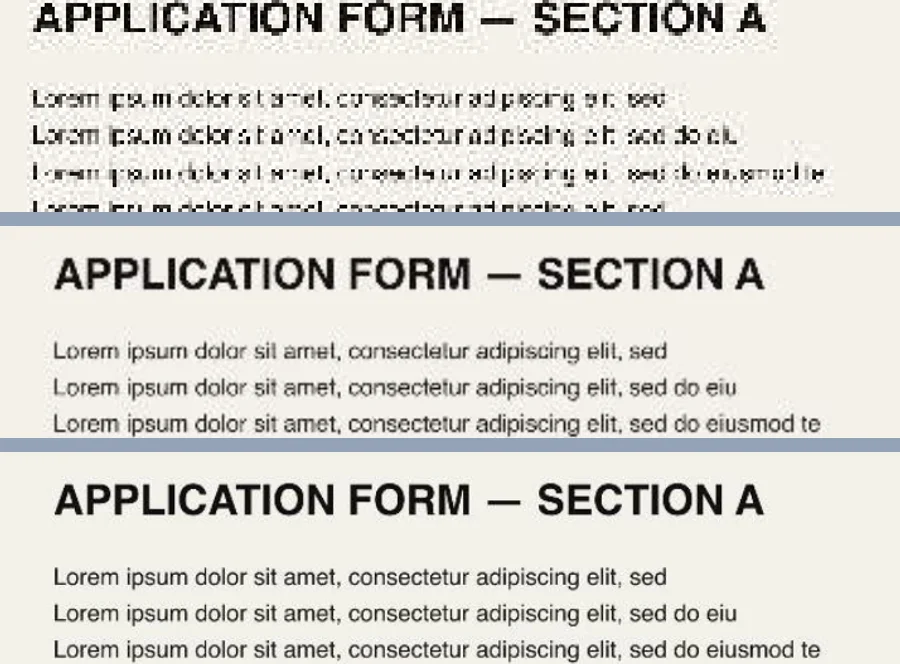
What fits in 200 KB
Measured with this converter on A4 pages: a single full-page scan keeps 1016 × 1437 pixels, about 123 pixels per inch, and reads cleanly. Two scanned pages keep 650 × 920 pixels each, so a two-page document stays readable. A 12-megapixel photo keeps 1652 × 1239 pixels.
Five scanned pages in 200 KB fall to 416 × 589 pixels each, roughly 50 pixels per inch, which blurs normal-size text. For longer documents, either split them into several files or choose a larger target if the form allows it.
Order and pages
Each image becomes one page, in the order shown in the list. Drag rows, or use the Move up and Move down buttons, to put the pages in order before converting; the order cannot be changed inside the finished PDF without another tool.
Choose A4 when the receiving office prints or reviews submissions as paper pages. Match image keeps each page the shape of its photo, which suits receipts and screenshots better than a fixed sheet.
How the limit is shared
The 200 KB is divided equally between the pages after a small allowance for the PDF structure. An image already smaller than its share is kept untouched; larger ones are re-encoded as JPEG, lowering quality first and resolution second, until the whole document fits.
That equal split means one large photo and one small screenshot are treated fairly: the screenshot keeps its original bytes if it already fits, and the photo gets the remaining budget.
How to convert JPG to PDF under 200 KB
Add the pages
Drop the photos or scans onto the drop area, or press Add files. Add them in page order, or reorder them in the list.
Confirm the target
File size is preset to Under 200 KB. Pick A4 for paper-shaped pages, or Match image to follow each photo.
Convert
Press Convert. All pages are combined into one PDF and fitted to 200 KB together.
Check before submitting
Read the final size in the status line and open the PDF to check every page is legible.
Frequently asked questions
How many pages fit in 200 KB?
Two scanned A4 pages stay comfortably readable. In our test five pages also fit, but each dropped to about 50 pixels per inch, which blurs normal text. Split longer documents into several files.
Will the quality be good enough for a certificate?
For one or two pages, yes. A single A4 scan keeps about 123 pixels per inch at 200 KB, which reads cleanly on screen and prints acceptably at small sizes.
Can I mix photos and screenshots?
Yes. Any image already small enough to fit its share is kept exactly as it is; only the larger ones are re-encoded.
Is anything uploaded?
No. Everything runs in your browser and nothing is sent to a server. The page keeps working with the network disconnected once your files are added.
Is there a watermark?
No. The PDF contains only your images, with no branding or added text.
What if it says the PDF is still too large?
That means the pages could not be fitted without becoming unusable. Remove pages, split the document into two files, or choose a larger File size target if the form accepts it.
Related converters
- JPG to PDF under 100 KBMake a PDF under 100 KB from photos or scans in one step, for forms with an upload limit.
- JPG to PDF under 50 KBFit a photo or a single document page into a PDF under 50 KB for strict upload limits.
- Image to PDFEvery supported image format into one PDF, in the order you choose.
- Aadhaar to PDFPlace the front and back of an Aadhaar card on one PDF page, as portals expect.