Documents & ID
Passport Photo to PDF Converter
Lay passport photographs out at 35 × 45 mm or 2 × 2 in on a PDF page.
- No sign-up
- Files never uploaded
- No watermark
- Up to 100 files
Add your imagesDrop your images here
Up to 100 pages, 200 MB per file. Nothing is uploaded.
The page is created at the millimetre size shown. Your originals are never modified.
Overview
Passport photographs are specified by physical size rather than by pixels, which is why a file that looks fine on screen can still be rejected. For a printed Indian passport application the photograph is 4.5 cm × 3.5 cm, which is 35 × 45 mm portrait, as the Passport Seva application instructions state; the United States Department of State specifies 2 × 2 inches, which is 50.8 × 50.8 mm. This tool creates a PDF page at exactly those dimensions and places your photograph inside it, so what you upload measures the right amount.
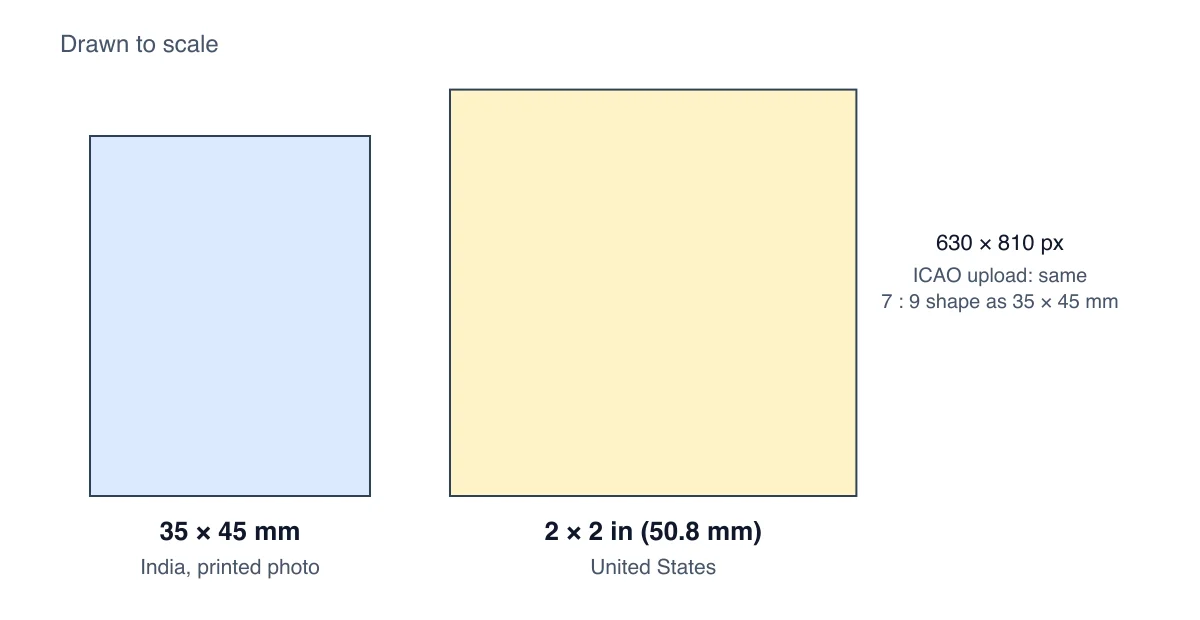
The two sizes this tool produces
The Indian passport photograph is 35 × 45 mm, portrait — the Passport Seva application booklet gives it as 4.5 cm length × 3.5 cm width. In PDF points that is 99.2 × 127.6 pt, because a PDF point is 1/72 inch and 45 mm is 1.772 inches. At 300 DPI the same area is 413 × 531 pixels.
The US passport photograph is 2 × 2 inches square, which is 50.8 × 50.8 mm, or 144 × 144 pt. At 300 DPI it is 600 × 600 pixels. Both are produced as a single PDF page holding one photograph.
Getting the photograph right
Photograph the subject facing the camera squarely, with the head and the top of the shoulders in frame, against a plain light background. Passport specifications generally require a neutral expression, both eyes visible, and no head covering unless worn for religious reasons — but those are eligibility rules for the issuing authority, not something a converter can check.
With the margin set to No margin the image fills the page exactly, so any surrounding background in the photograph becomes part of the printed area. With Small margin there is a 10 pt border, which some forms prefer. Choose whichever the form you are filing asks for.
How to convert Passport Photo to PDF
Pick the passport
Choose Passport photo — 35 × 45 mm for an Indian passport, or US passport photo — 50.8 × 50.8 mm for a US application.
Add the photograph
Drop the image onto the drop area or press Add files. Set the margin to No margin if the image should fill the page.
Convert
Press Convert. The photograph is placed on one PDF page at the size you selected, keeping its aspect ratio.
Download and check
Open the PDF and confirm the page dimensions match the specification before submitting it.
Print size, online upload and other 2 × 2 inch figures
Three different numbers circulate for Indian photographs. The printed passport photograph is 35 × 45 mm (4.5 cm × 3.5 cm), which is what this tool’s Indian preset produces. Passport Seva’s online upload and photo-capture guidance for ICAO-compliant photographs is stated in pixels instead — 630 × 810 — so a portal asking for pixels is asking for something a physical-size PDF cannot answer. A 2 × 2 inch (51 × 51 mm) square is the US passport size and also appears on some Indian visa, OCI and older documents.
Requirements are set by the office or portal you are dealing with and are revised from time to time. Treat this page as the arithmetic for converting a stated size into a PDF page, and confirm the figure on the current form or on passportindia.gov.in before submitting.
Resolution is your choice, not the converter’s
Because the page is defined in millimetres, the resolution you supply decides how much detail fits inside it. At 300 DPI a 45 mm edge is 531 pixels, which is the standard density for photographic print. At 72 DPI the same edge is 127 pixels, which would be visibly soft. Supply the best photograph you have; the tool does not upscale it, and no tool can recover detail that was never captured.
Frequently asked questions
What size is an Indian passport photo?
35 × 45 mm, portrait (4.5 cm length × 3.5 cm width) for a printed application, per the Passport Seva application instructions. That is 99.2 × 127.6 PDF points, or 413 × 531 pixels at 300 DPI. This tool creates the PDF page at exactly 35 × 45 mm.
Why do some sites say an Indian passport photo is 2 × 2 inches?
The 2 × 2 inch (51 × 51 mm) square is the US passport size, and it is also used on some Indian visa, OCI and older documents. For a printed Indian passport application the instructions give 4.5 cm × 3.5 cm. Online upload guidance is expressed in pixels (630 × 810). Always confirm against the form you are filling in.
What size is a US passport photo?
2 × 2 inches square, which is 50.8 × 50.8 mm or 144 × 144 PDF points. At 300 DPI that is 600 × 600 pixels.
Will the image be recompressed?
Not unless you ask. By default JPEG images keep their original compressed stream and PNG images keep their original data, so the pixels you supply are the pixels in the PDF. If you choose a File size target, the image is re-encoded as JPEG to fit it.
Are my photographs uploaded?
No. Everything runs in your browser. Nothing is transmitted or stored, which is the reason this tool exists rather than a photo studio.
Does the tool check whether my photo meets the rules?
No. It only controls the physical size of the page. Whether the photograph is acceptable in other respects — background, expression, head position — is decided by the issuing authority.
Can I put more than one photo on a page?
Each conversion produces one PDF page holding one photograph. Convert the same image more than once with different sizes if you need both the Indian and US dimensions.
Guide
- Indian passport photo size
Three different figures circulate for Indian passport photographs: 35 × 45 mm, 2 × 2 inches, and 630 × 810 pixels. They apply to different situations. This guide sets out which applies where, citing Passport Seva’s own documents.
Related converters
- JPG to PDF under 50 KBFit a photo or a single document page into a PDF under 50 KB for strict upload limits.
- JPG to PDF under 200 KBCombine photos or scanned pages into one PDF under 200 KB, sized in a single step.
- JPG to PDFTurn JPEG photos and scans into a single ordered PDF document.
- Aadhaar to PDFPlace the front and back of an Aadhaar card on one PDF page, as portals expect.