Convert from PDF
PDF to Transparent PNG Converter
Render PDF pages to PNG with the page background removed for overlays.
- No sign-up
- Files never uploaded
- No watermark
- Up to 200 MB per PDF
Drop a PDF file here
Up to 200 MB. Every page is rendered locally; nothing is uploaded.
Rendering happens in your browser. Higher resolution means larger files, and PNG output stays lossless at any size.
Overview
A PDF page is defined against a nominal white background — the format has no concept of the page being transparent, so a transparent PNG is always something you make rather than something you recover. This tool renders the page and then removes that background, leaving a PNG with an alpha channel. That is what you want when the output is a logo, an overlay, or a graphic destined for a coloured background.
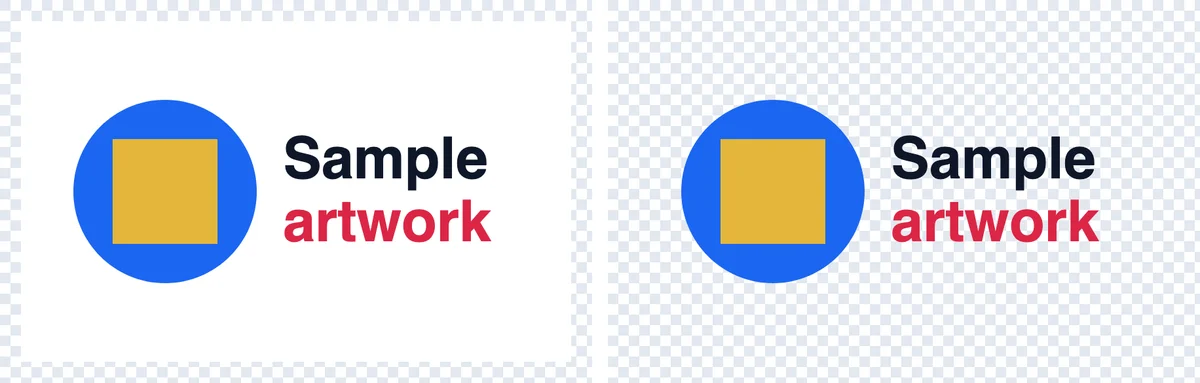
What you will actually get
How it works matters, because it determines what you get back. The tool renders the page and then removes the white background from the rendered image. Anything the document actually painted in white — a deliberate rectangle, a white shape, a filled box — is removed along with it, because there is no way to tell an intended white shape from an unpainted background once the page has been rasterised.
What this suits is content on an otherwise empty page: a logo, a diagram, a chart, a signature. What it does not suit is a document that lays content out on a white panel or a page that already carries a background fill, since both come back with holes in them. For those, convert to PNG without the transparency option.
Why JPEG cannot do this
JPEG has no alpha channel, so a transparent-background PNG cannot be encoded as a JPEG at all. That is part of why PNG is the right output format here: it stores transparency losslessly and it is read by essentially every image editor.
The page content is not recompressed further, so the conversion adds no artefacts of its own.
Choosing a resolution
Because the page is rasterised from vector data, resolution is a real choice and higher is genuinely better. The Screen setting matches typical screen rendering; the Print setting at 288 DPI produces four times the pixels in each direction, and 300 DPI is the usual standard for commercial print.
Note that anti-aliased edges in the output are semi-transparent pixels rather than fully transparent ones. That is correct behaviour, and it is what lets the edge blend smoothly against whatever background you place it on.
How to convert PDF to Transparent PNG
Add your PDF
Drop a PDF file onto the drop area, or press Choose PDF to browse. Each page becomes its own PNG.
Choose the resolution
Match PDF at the Screen setting suits web and screen use. Choose the Print setting for output destined for print.
Render
Press Render to PNG. Every page is drawn in your browser with the page background left unpainted.
Check the result
Open a rendered PNG over a coloured background to confirm the transparency carried through. Where the PDF paints its own white background it will not, and that is a property of the file.
Frequently asked questions
Will my PNG actually be transparent?
In practice, yes for artwork sitting on an empty page: a logo, a diagram, a chart. The background is removed by luminance, so anything the document deliberately painted white — a filled rectangle, a layout panel — is removed too. Check the output over a coloured background before you rely on it.
Is the PDF uploaded to a server?
No. Rendering happens in your browser with the pdf.js renderer. Nothing is transmitted, which matters for confidential documents.
Can I get a transparent JPEG?
No. JPEG has no alpha channel, so transparency cannot be represented in one. PNG is the correct format for this and is what the tool outputs.
What resolution should I choose?
Match PDF at Screen for web use and screen viewing; the Print setting when the output is going to print. Higher resolution produces proportionally larger files.
Why are my edges grey rather than fully cut out?
Anti-aliased edges come back partially transparent rather than fully cut out. That is deliberate: a hard edge shows a visible fringe against any background other than white, and partial transparency lets the edge blend cleanly.
Is there a watermark or file limit?
No watermark and no sign-up. Files up to 200 MB are rendered locally on your device.
Related converters
- PDF to PNGExtract every PDF page as a separate lossless PNG image.
- PDF to JPGRender PDF pages as smaller JPEG images for sharing and web use.
- PNG to PDFCombine PNG images into one multi-page PDF, preserving full resolution.
- Image to PDFEvery supported image format into one PDF, in the order you choose.