Documents & ID
JPG to PDF Under 100 KB
Make a PDF under 100 KB from photos or scans in one step, for forms with an upload limit.
- No sign-up
- Files never uploaded
- No watermark
- Up to 100 files
Add JPG filesDrop JPG files here
Up to 100 pages, 200 MB per file. Nothing is uploaded.
Page size and margin apply to output pages. A file-size target re-encodes images as JPEG to fit; leave it on Original to keep every pixel. Your originals are never modified.
Overview
Application portals often reject anything over 100 KB, and a single phone photo is usually several megabytes. The common advice is to convert first and compress afterwards, often with a second tool that wants an account for its stronger setting. This page does both in one step: the File size target is already set to Under 100 KB, so the PDF you download is under 100 KB, or the page tells you plainly that it could not get there.
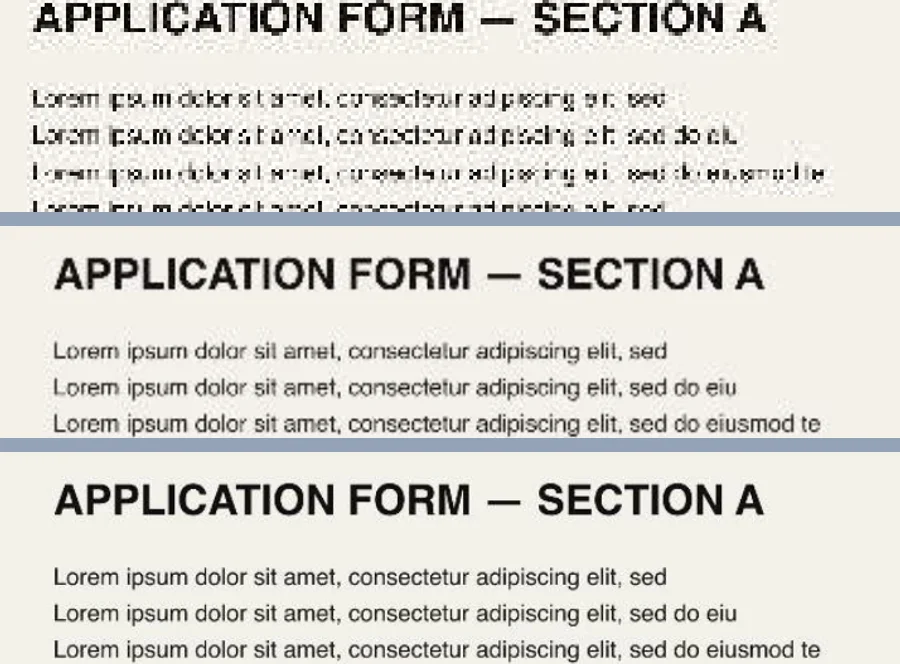
What fits in 100 KB
We measured it with the converter on this page, on A4 pages. A 12-megapixel photograph came out as a 99 KB PDF with the image at 1321 × 991 pixels, which is plenty for an on-screen photo check. A full A4 document scan came out at 650 × 920 pixels, about 79 pixels per inch across the page: body text is readable but soft, and headings are clear.
Two scanned pages share the same 100 KB, so each falls to 416 × 589 pixels — roughly 50 pixels per inch — and small print starts to break up. If the form allows it, put each page in its own file, or use the 200 KB version for two-page documents.
How the size target works
The 100 KB is shared equally between the images, after a small allowance for the PDF structure itself. Any image already under its share is left exactly as it is. Larger ones are re-encoded as JPEG: quality is lowered first, from 92% down to 50%, and only if that is not enough is the resolution reduced, in steps of 20%, until the image fits.
Transparent PNG areas are flattened onto white, because JPEG has no transparency. If even the smallest attempt is still over 100 KB — which takes a large number of pages — the status message shows the size that was reached instead of pretending it succeeded.
Getting the sharpest result at 100 KB
Crop before converting. Every pixel of background around a document costs bytes that could have gone to the text. A scan cropped to the paper edge looks noticeably sharper at the same file size.
Prefer one page per file. Detail per page halves every time the page count doubles at a fixed size limit, so a portal that accepts several 100 KB files is better served by several single-page PDFs than by one combined file.
How to convert JPG to PDF under 100 KB
Add your images
Drop photos or scans onto the drop area, or press Add files. JPG, PNG, WebP and iPhone HEIC photos are all accepted.
Check the size target
File size is already set to Under 100 KB. Choose A4 if the form expects standard paper pages.
Convert
Press Convert. The images are re-encoded only as much as needed to keep the whole PDF under 100 KB.
Check the result
The status line shows the final file size. Open the PDF and confirm the text is readable before you submit it.
Frequently asked questions
Will my PDF definitely be under 100 KB?
For one to a few pages, yes. The converter lowers quality and then resolution until the whole PDF fits, and the status line shows the final size. With many pages it can run out of room while keeping the images usable, and it says so instead of producing an unreadable file.
Is a document still readable at 100 KB?
One A4 page, yes: in our test it came out at 650 × 920 pixels with readable body text. Two pages in one 100 KB file drop to 416 × 589 pixels each, where small print starts to blur.
Do I need to compress the PDF afterwards?
No. The size target is applied while the PDF is built, so there is no second step and no separate compression tool.
Are my documents uploaded?
No. The conversion and compression both run in your browser. Nothing is sent to a server, which matters for identity documents and certificates.
Can I convert iPhone photos?
Yes. HEIC photos are decoded in the browser, including on Windows, and then compressed to fit the same 100 KB target.
What if the form allows a different size?
Change the File size option before converting: 50 KB, 200 KB, 500 KB, 1 MB and 2 MB are available. Pick the largest size the form allows for the sharpest result.
Guide
- How to make a PDF under 100 KB
Upload forms often cap files at 100 KB. This guide explains what that limit means in bytes, shows measured results for how much detail survives at 50, 100 and 200 KB, and gives the steps to make a PDF that fits and is still readable.
Related converters
- JPG to PDF under 200 KBCombine photos or scanned pages into one PDF under 200 KB, sized in a single step.
- JPG to PDF under 50 KBFit a photo or a single document page into a PDF under 50 KB for strict upload limits.
- Aadhaar to PDFPlace the front and back of an Aadhaar card on one PDF page, as portals expect.
- JPG to PDFTurn JPEG photos and scans into a single ordered PDF document.